Thursday, November 10, 2011


Wednesday, November 9, 2011
Marvel Starts Digital Relationship With Barnes and Noble | Geeks of Doom
Marvel Comics announced this week that the popular comics company would be bringing collected digital editions of their line of graphic novels to both the upcoming Barnes and Noble Nook tablet, as well as the Nook Color.
With the release of Barnes and Noble’s Nook tablet hitting stores (and digital storefronts) next week, considering the success of digital comics, it was only a matter of time before we heard some news regarding comics on the device. Do you remember when DC Comics took their digital collections exclusively to Amazon’s Kindle line, and then how Barnes and Noble got all mad that they didn’t get to play with DC’s toys? Well, it looks like Marvel has stepped in to fill the hole in Barnes and Noble’s heart.
Starting next week, Marvel will bring several digital collected editions of their most popular story lines to the Nook store including Civil War, Invincible Iron Man, Captain America, John Michael Straczynski’s Thor, Astonishing X-Men, New Avengers, and many more. Whether or not these collected editions will be in “volume” style, or if they’re going to be complete collections is unknown, but either way, as someone who follows the progress in digital media, this is really exciting news. Marvel was the last major publisher to put both feet in the digital realm, but alongside their recently announced expanded day and date single issue initiative, they’re adding the final bit of legitimacy in the digital comic sphere.
Now, it appears as though Marvel will be using the Nook exclusively for the time being, but in two weeks, they could very well announce availability for the Kindle, as well. So be on the look out here at Geeks of Doom for more info regarding this news. But until then, if you want to just read digital comics collections, you’re going to need a Nook and a Kindle. These holidays are definitely not going to be wallet friendly.
[Source: Marvel]

Thursday, June 2, 2011
Tuesday, November 30, 2010
Root your Nook Color to make a DIY 7-inch Android tablet
Got a Nook Color? Want to use it as a tablet as well as a color LCD reader? Well now you can thanks to nookDevs and a bit of Android rooting action. With a 800MHz ARM chip powering a modified Android ROM, it was fairly obvious from the get-go that the Color could make for a decent, cheap, DIY tablet, and now that dream has been realized. Of course the actual process of rooting the Nook Color is pretty involved -- it's no simple unlock like Windows Phone 7 -- but anyone with a keen eye, access to a Linux machine, and a bit of terminal-fu, can turn their $250 reader into a 7-inch IPS-wielding, Wi-Fi-connected, Android tablet.Head on over to nookDevs for full instructions, but be warned, just because it's technically legal to jailbreak your device doesn't mean you don't void your warranty in doing so, and of course you could brick your device. That said, let's get rooting!
Tags: android, barnes and noble, BarnesAndNoble, e-reader, jailbreak, nook, nook color, NookColor, rooting, tablet

Tuesday, August 24, 2010
Read All Your eBooks on Nook for PC and Portable Devices
Would you like to take advantage of the eBooks available for the Barnes & Noble Nook without buying a new device? Today we look at Nook for PC, Netbooks, Android, and Apple iOS devices.
Nook for PC
If you’ve got a laptop or a netbook, you’ve already got a nice eBook reading device. The Barnes and Noble Nook for PC lets you read your Nook eBooks, eNewspapers, and more on any of your computers. It’s available for both Mac and PC, but here we’ll look at the Windows version.
Head to the Nook apps website (link below), and download Nook for PC to your computer.
Once it’s downloaded, install it as normal on your computer.
On first run, you’ll need to enter your B&N account info, or if you don’t already have an account, click Create An Account at the bottom.
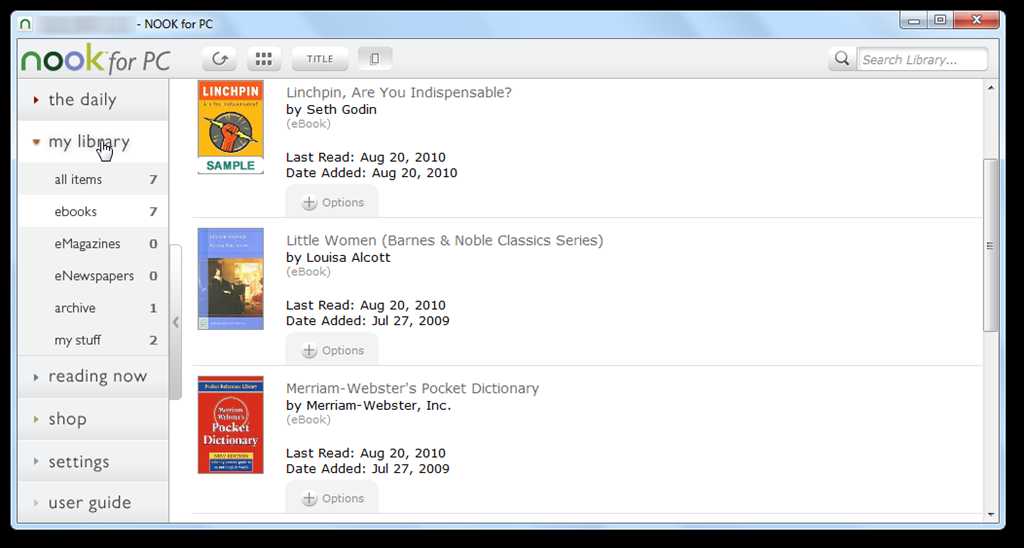
Once you’re signed in, you’ll see any books already on your account in the my library section of the sidebar.
Click the Shop link to access the Barnes & Noble’s eBook store online to browse and purchase books, or just go to the B&N website in your browser (link below). If you’re not sure if you will like a book, you can always download a free sample to try it out first.
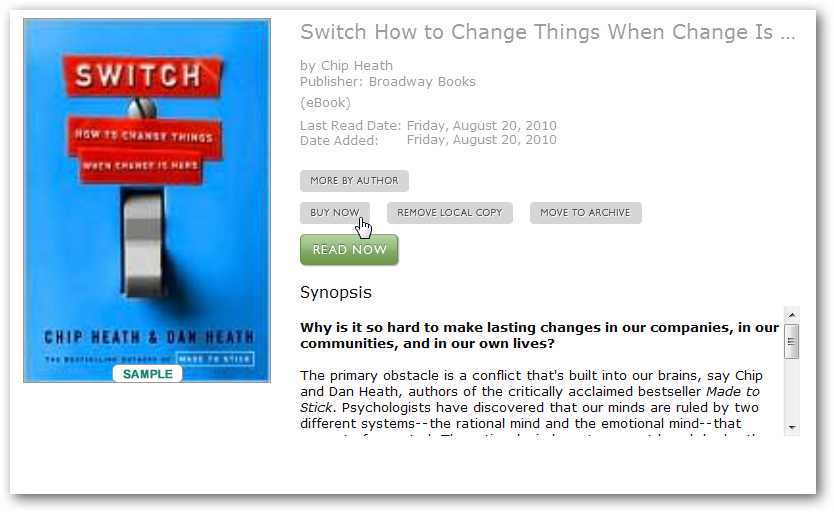
Once you’ve got some books, you can read them from the my library link on the left sidebar in Nook for PC. Click Read Now to start reading a book, or you can choose to see more details about the book or archive it.
Here’s the details page, showing more info in Nook for PC about the sample book we downloaded.
And here’s the reading screen with a sample book. You’ll notice that the eReader makes the eBook almost feel like a paper book, complete with page numbers, 2 columns of text, and nice text formatting.
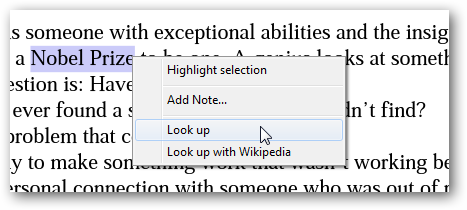
However, Nook also lets you take advantage of the digital form of your book. You can select text in an eBook to look it up in the included dictionary or on Wikipedia in your browser, or you can highlight and add notes to the section.
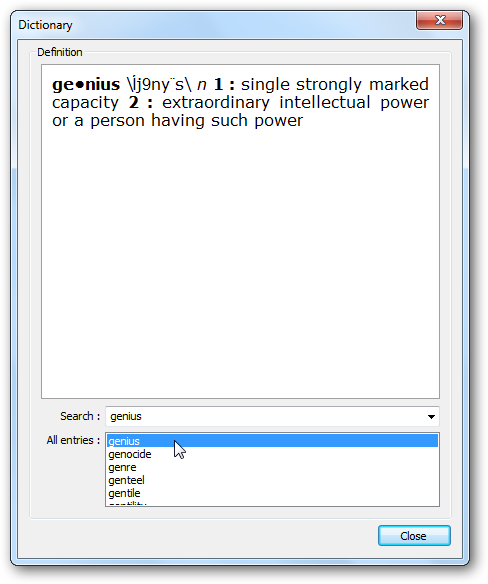
Here’s the included dictionary that opened when we looked up a word. Very handy!
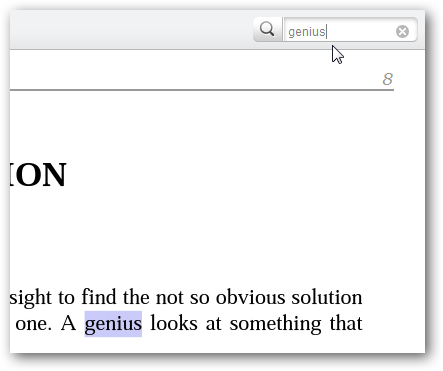
Nook also lets you search the contents of your eBook from the top right corner of the application.
You can also add eBooks that you already own to Nook for PC. This is a great way to make it your main eBook reader without purchasing a ton of new books. In the my library section on the left sidebar, select my stuff. Now you can click Add New Item to import an eBook.
Nook for PC lets you add PDF, ePub, and pdb formatted eBooks, including PDFs secured with Adobe Digital Editions DRM. However, you cannot import your eBooks from other eReader programs such as Kindle for PC, as these include DRM that can only be read by Kindle.
Here’s a PDF eBook in Nook for PC. One nice thing is that it automatically remembers your current position in the book, so your imported eBooks work just like your Nook eBooks.
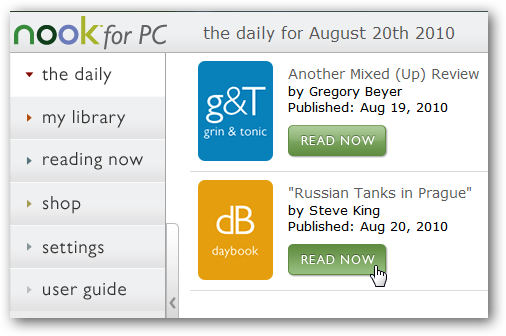
Nook also includes a daily review and interesting fact about the day in the daily section.
Click Read Now to read this tidbit of information about the day.
Nook for PC also lets you subscribe to newspapers and magazines just like the Nook device. You can browse the available journals online, and even try them out for 14 days for free. Note that eNewspaper and eMagazine subscriptions may only work inside the US.
NOOK study for Students
If you’re a college student, you’ve likely noticed that textbooks are a strain on both your wallet and your back. Barnes & Noble has a special edition of Nook for PC called NOOKstudy that’s a great way to get your textbooks cheaper and easier on your netbook or laptop. Many popular textbooks are currently available on it, and you can often either purchase your textbooks or rent them to save money.
First, download NOOK study from the link below, and install it on your computer as normal. If you’re already using Nook for PC, you can just install NOOKstudy in addition to it and use the one you want depending on what you’re reading.
When you first run NOOK study, login with your existing B&N account or create a new account as in the Nook for PC app.
Next, select a state and school, and click Sign In. NOOK study will be integrated with your Adobe ID if you have one so it can read DRM-protected PDF files as well.
Once you’re signed in, you’ll see your Nook books listed in NOOK study. You can use this program as your primary eBook reader if you like, as all B&N eBooks will work fine in it. However, eTextbooks will only work in NOOK study, so you won’t be able to use eTextbooks in Nook for PC or on a Nook device.
Click the book bag icon in the toolbar to search for textbooks you need for your classes.
This will open the B&N store in your browser, and will open a page about your textbook if it’s available. Note that many eTextbooks are only available for for 180 day rental, but if you only need the book for one semester, this should work fine. If you’re not sure about reading a textbook on your computer, you can read the book for a free 7 day trial first before purchasing it.
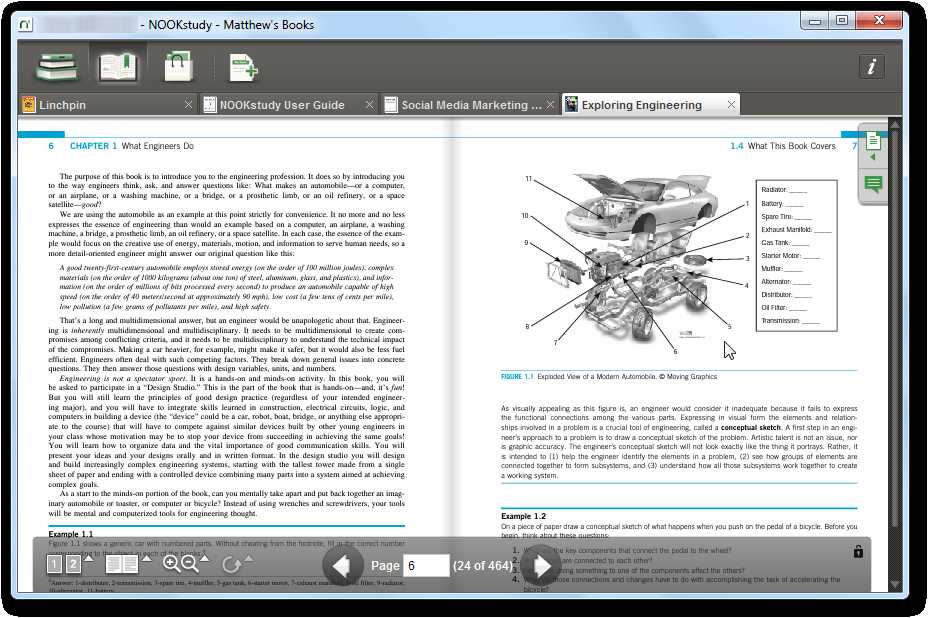
Here’s a textbook open in NOOK study. You can see 2 pages at once just like you would in a paper book, and can see full-color pictures, diagrams, and more right on your computer.
You can adjust your eBook settings from the toolbar at the bottom and zoom in to make it easier to read.
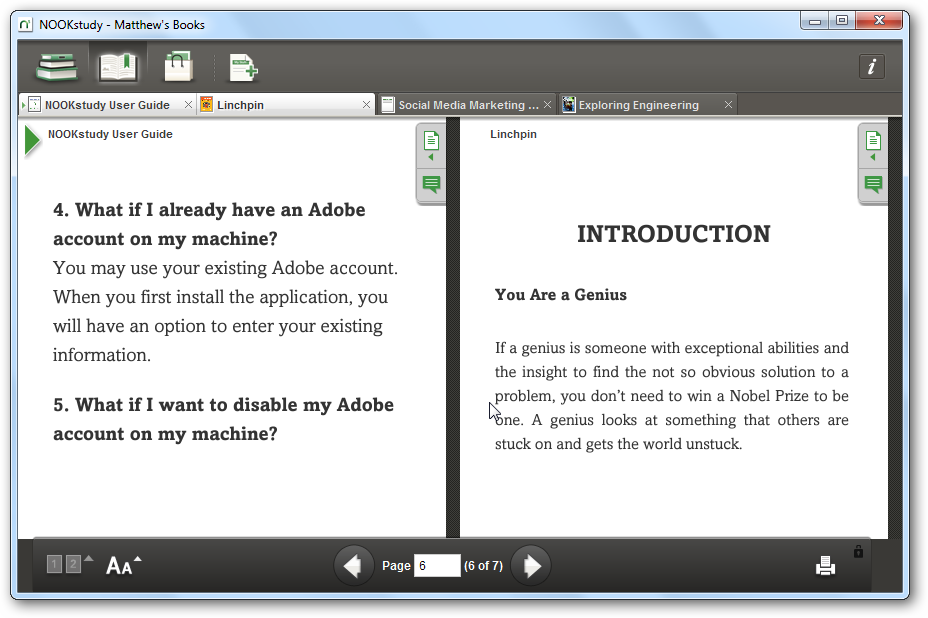
If you’re trying to compare what two different books say about a topic, you can easily do this. Click the button on the far left of the toolbar to select another book to view side-by-side. Here we have 2 books together in NOOK study.
NOOK study makes it very easy to get more info about the text in your eBooks. Select any text to copy it or look it up on Google, Wikipedia, Wolfram Alpha, and more. You can also highlight and add notes to your textbooks as normal.
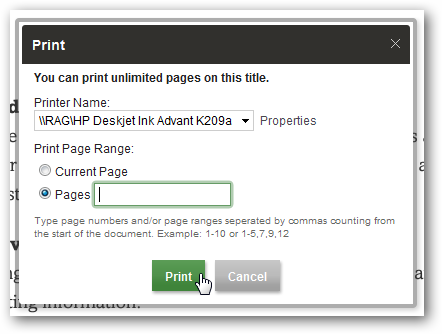
Select eBooks also let you print them, which is a great feature not included with the standard Nook for PC app. Most textbooks will include limitations on printing rights, so check your textbook’s info to see what you can do with it.
Nook for iOS
Nook is also available for your iPhone, iPad, and iPod Touch. Just download the correct version for your device. Here we look at it running on an iPod Touch.
It essentially works the same as it does on the PC. When you first start it you get a guide on how to control the app on your iOS device. You can go back to the user guide at anytime as it’s included in your library.
Here is an example of an eBook running on the iPod Touch, you can easily use the slider to navigate to different areas of the book, change text size…etc.
You can search different types of media in different categories.
Nook for Android
The Nook Reader is also available for Android 1.6 and above, but we didn’t have time to test it out and show it to you in this article. If you’ve had good luck with it on your Android device, definitely let us know in the comments.
Nook’s eBook apps bring Barnes and Noble’s eBook inventory to a wide range of devices. Even if you don’t own a Nook device, you can still take advantage of the books, textbooks, newspapers, and more. We were impressed with the wide range of features included in the Nook eBook apps, and especially liked the ability to import PDF and ePub format into Nook for PC. The reader apps included many features that other eBook readers don’t, such as searching the contents of the eBook and copying text. Give it a try, and let us know what you think.
If you’d like to read Kindle eBooks on your computer, check out our article on the Kindle Apps, including:
- Read Kindle Books On Your Computer with Kindle for PC
- Read Mobi eBooks on Kindle for PC
- Preview and Purchase eBooks with Kindle for PC
- Deactivate Kindle for PC Online or on the Desktop
Nook Links
Download Nook for Your PC, iOS, Android, or other device
![sshot-2010-08-20-[2]](http://www.howtogeek.com/wp-content/uploads/2010/08/sshot201008202.png)
![sshot-2010-08-20-[3]](http://www.howtogeek.com/wp-content/uploads/2010/08/sshot201008203.png)
![sshot-2010-08-20-[5]](http://www.howtogeek.com/wp-content/uploads/2010/08/sshot201008205.png)

![sshot-2010-08-20-[42]](http://www.howtogeek.com/wp-content/uploads/2010/08/sshot2010082042.png)
![sshot-2010-08-20-[13]](http://www.howtogeek.com/wp-content/uploads/2010/08/sshot2010082013.png)

![sshot-2010-08-20-[21]](http://www.howtogeek.com/wp-content/uploads/2010/08/sshot2010082021.png)

![sshot-2010-08-20-[10]](http://www.howtogeek.com/wp-content/uploads/2010/08/sshot2010082010.png)
![sshot-2010-08-20-[50]](http://www.howtogeek.com/wp-content/uploads/2010/08/sshot2010082050.png)
![sshot-2010-08-11-[02-10-50]](https://lh3.googleusercontent.com/blogger_img_proxy/AEn0k_vtokkJGK6eL5ZC6eTa4A1Um394-ZptgBO-kbTvY1RYhr3RRk9NtAcvjzwVTxyyy0l22EJVjaTN1nBtko_GMTryXb0Aa0kaRuQfNCHodiKuQONsVhr4klsUVBXbJmNb02YuteLah0BVmIByDZr2lg=s0-d "sshot-2010-08-11-[02-10-50]")
![sshot-2010-08-20-[20]](http://www.howtogeek.com/wp-content/uploads/2010/08/sshot2010082020.png)
![sshot-2010-08-20-[25]](http://www.howtogeek.com/wp-content/uploads/2010/08/sshot2010082025.png)


![sshot-2010-08-20-[32]](http://www.howtogeek.com/wp-content/uploads/2010/08/sshot2010082032.png)
![sshot-2010-08-20-[31]](http://www.howtogeek.com/wp-content/uploads/2010/08/sshot2010082031.png)
![sshot-2010-08-20-[35]](http://www.howtogeek.com/wp-content/uploads/2010/08/sshot2010082035.png)
![sshot-2010-08-20-[37]](http://www.howtogeek.com/wp-content/uploads/2010/08/sshot2010082037.png)
![sshot-2010-08-20-[16-25-55]](https://lh3.googleusercontent.com/blogger_img_proxy/AEn0k_uEaCuyelrzVE2gHNeriOxN9PehIKViNfDVFO0i77aDmsrWZ-C4tsED1893tmGyTOewhjAlUo5AGPBBlc3Ku9mroyYsQCBuwxyHUOEo9CW8IRY4aBR4FwVZ1BXnV6MlbMk5S6yfwH2q9R2LIIvp=s0-d "sshot-2010-08-20-[16-25-55]")
![sshot-2010-08-20-[16-26-41]](https://lh3.googleusercontent.com/blogger_img_proxy/AEn0k_vcScf0q-w3W_i1z4V3vrSNv4QYgqb6AtSkvpu2oMlgBYaRFqZklrZmZAISXkOPyUZKsBDKaT_8sgZtyptJJMH7AZmlErZMprBC9IvB6MpljnRyw7TrHK7Of9wkIOsylRQCWvD95t6Oq7SDE7iluw=s0-d "sshot-2010-08-20-[16-26-41]")
![sshot-2010-08-20-[16-27-12]](https://lh3.googleusercontent.com/blogger_img_proxy/AEn0k_v2ENVt9os-Rm7e6Sp3BuJwnHON7A1e9zZuVYw-hm6WWh6Itm1rT5ocRYd3qwctEOxkoyF3Yj5RXCv8MtE3933GAy2EPlnDotNd40O0vTllu6KVmSK8FRYOMiToN6ZMqVsVqy6FPQpuBowAMfUy5Q=s0-d "sshot-2010-08-20-[16-27-12]")
![sshot-2010-08-20-[16-27-37]](https://lh3.googleusercontent.com/blogger_img_proxy/AEn0k_v8BbYejhUpXRSXkls9EWIj_LV9cRf3qZQ2KdkjYFBum25oFwwx4CuJY3bYzt9Fa6NBm9Zv61cf0kMtsfbIbYgmZPTXqmaxFVIyDR2WNIe8jPN-P4E0WAtHZhVBmUsAb9jzZdhp81BAFpayG0ULkA=s0-d "sshot-2010-08-20-[16-27-37]")
![sshot-2010-08-23-[18-28-15]](https://lh3.googleusercontent.com/blogger_img_proxy/AEn0k_t6aa-CU5od15YETtjGJMz8asfKDGr0i5sJG4Ybz-Ra_FwliG6haJOSRlar33jdGRfuZ85z0IBEFTioW-yiFjZ2vU3xKZiPaN7031d1VTojk_YSsEqUe9H4aMzX9jurU6BRpUOyQnl0dTiIExdk0Q=s0-d "sshot-2010-08-23-[18-28-15]")
Monday, July 12, 2010
NOOKstudy: Barnes & Nobles’ free digital foray into the education market lets students read e-textbooks, take fully searchable notes & highlights
Barnes & Noble has developed NOOKstudy, a free (as in beer) software suite that could make the average college student’s life a little easier. The software, which will be available for the PC and Mac, gives students the ability to download and organize electronic textbooks, as well as keep all of their notes, syllabuses, and so on in one safe place. Handy. And no, you don’t need a nook to use NOOKstudy.
Some of the details seem promising. Students can read multiple textbooks (or other sources) simultaneously, and they’re able to highlight and take notes from right within the software. Even more importantly, any notes or highlights you make are completely searchable. So, if you’ve highlighted an important paragraph on page 12 of chapter 4 in SomeBook, well, you can easily pull it up long after you’ve turned off your computer.
In an ideal world, you’d be able to have all of your textbooks on your laptop, as well as any notes or assignments or whatever that otherwise would be scattered all over your Desktop. The less textbooks you have to carry the less of a chance you have of your back giving out as you walk to class.
This, of course, fully depends on whether or not your textbooks are available in electronic format. Your mileage may vary, but Barnes & Noble will have good selection, and often at discount. Can’t go wrong there.
NOOKstudy has been on trial for a little while now at several school around the country, and the final product is the result of input from students and professors alike.
All in all, doesn’t seem too bad at all, at least from the outside looking in—maybe the name could have used some more work. Presumably we’ll give it a through look-see as its release approaches.

Monday, June 21, 2010
Barnes & Noble Confirms New $149 NOOK Wi-Fi, Drops 3G Model Price To $199

Barnes & Noble has just confirmed the NOOK Wi-Fi at $149, and a new lower price for its NOOK 3G model at $199. It can be ordered online now from Nook.com or BestBuy.com and will begin shipping this week.
Engadget had earlier today posted a screenshot sent in by a reader that effectively showed a Nook WiFi coming out on Wednesday at the now announced price point.
The new NOOK Wi-Fi offers all the features of NOOK 3G (including a 3.5” LCD color touchscreen for navigation and a 6” E-Ink display for e-reading) plus Wi-Fi connectivity.
Nice extra: with its latest software update for all NOOK devices, B&N is offering all customers complimentary access to AT&T’s Wi-Fi network, including its own book stores which have previously been available to NOOK customers.
The latest NOOK software (v1.4) also comes with a new ‘Go To Page’ feature, which allows customers to jump to a specific page number in an open eBook, an extra extra large font and performance enhancements to open digital books faster.
Barnes & Noble says it expects NOOK Wi-Fi will be in-stock in select Barnes & Noble and Best Buy stores for immediate purchase later this month and rolling out to all stores ‘later this summer’.
Full press release:
Barnes & Noble Introduces NOOK™ Wi-Fi® and Lowers NOOK 3G Price, Giving Book Lovers Greater Choice and Even Greater Value
At Only $149, Wi-Fi-Only Addition to NOOK Family is the Most Full-Featured, Low-Cost eBook Reader on the Market, Now Available Online at www.nook.com
Bestseller NOOK 3G is First Dedicated eBook Reader with Free 3G Wireless and Wi-Fi Connectivity Available at $199
Latest Software Update to Both NOOK Models Offers NOOK Customers Complimentary Access at All AT&T Wi-Fi Hot Spots and Improved Reading Features
NEW YORK–(BUSINESS WIRE)–Barnes & Noble, Inc. (NYSE: BKS), the world’s largest bookseller, is giving book lovers more choice and greater value in dedicated eBook Reading devices with the addition of NOOK Wi-Fi to the NOOK by Barnes & Noble family for just $149, and a new lower price for its award-winning NOOK 3G at $199. The new NOOK Wi-Fi offers all the great features of NOOK 3G – a color touch screen for navigation and best-in-class E-Ink® display for a great reading experience – plus Wi-Fi connectivity. NOOK Wi-Fi is now available to order online at www.nook.com and www.bestbuy.com.
“People who love to read will find tremendous value with the new NOOK Wi-Fi, the most full-featured, low-cost eReading device on the market, and our bestselling NOOK 3G now at an even lower price”
Barnes & Noble’s new price for NOOK 3G marks the market’s first under-$200 dedicated full-featured eBook reader that offers both free 3G wireless and Wi-Fi connectivity. And Barnes & Noble continues to enhance the eReading experience for all NOOK 3G and NOOK Wi-Fi owners through its latest 1.4 software update, now offering even more places to connect to Wi-Fi for free and faster access to the content they want to read.
NOOK Wi-Fi eBook Reader marries innovative technology and sleek minimalist design with Wi-Fi connectivity. This latest addition to the NOOK family gives customers the opportunity to take advantage of the proliferation of both in-home and public Wi-Fi hotspots, where they can browse the Web and shop the Barnes & Noble eBookstore of more than one million eBooks, periodicals and other digital content. With its latest software update for all NOOK devices (now available at www.nook.com/update), Barnes & Noble is offering all NOOK customers complimentary access to AT&T’s entire nationwide Wi-Fi network, including Barnes & Noble book stores which have previously been available to NOOK customers.
As part of the NOOK eBook Reader family, NOOK Wi-Fi features Barnes & Noble’s breakthrough LendMe™ technology, enabling customers to share eBooks with friends for up to 14 days. NOOK Wi-Fi also offers the same great in-store features like Read In Store™ to browse complete eBooks in Barnes & Noble stores at no cost, and More In Store™, offering free, exclusive content and special promotions.
“People who love to read will find tremendous value with the new NOOK Wi-Fi, the most full-featured, low-cost eReading device on the market, and our bestselling NOOK 3G now at an even lower price,” said Tony Astarita, Vice President, Digital Products, Barnes & Noble.com. “This expanded choice offers best-in-class, best-priced dedicated eBook Readers featuring eBook sharing, access to our vast eBookstore, great free and exclusive content and much more. And with expansion of fast and free Wi-Fi access beyond Barnes & Noble stores to thousands of AT&T Wi-Fi Hot Spots, we’re bringing additional freedom and flexibility to all NOOK 3G and NOOK Wi-Fi customers.”
Just like NOOK 3G, NOOK Wi-Fi features:
Enriched eReading: Enjoy an immersive reading experience with color book covers to browse in your library or while shopping, fast page turns, multiple font choices and sizes and more.
Dual displays: A fun, easy-to-use reading experience on the familiar paper-like 6” E-Ink display which offers great contrast with no backlight or glare even in bright sunlight, and 3.5” LCD lower color touchscreen for navigation.
Vast catalog of content: Shop the Barnes & Noble eBookstore for everything from classics to current bestsellers and download your content wirelessly in seconds. There are more than one million eBooks, magazines and newspapers available and free eBook samples.
Lend to friends: Share a wide range of eBooks with friends for 14 days using exclusive LendMe™ technology.
In-store experience: Access fast and free Wi-Fi connectivity in Barnes & Noble stores and enjoy the beta Read In Store feature to browse many complete eBooks for free, and the More In Store program, which offers free, exclusive content and special promotions.
Games, music and Web: Play Chess or Sudoku, listen to your favorite songs or browse the Web to check news and email.
Light and portable library: About the size and weight of a paperback, the 2GB device carries approximately 1,500 eBooks and offers virtually endless shelf space with expandable memory.
Your B&N personal library: With Barnes & Noble’s Lifetime Library™, Barnes & Noble digital purchases will be accessible on BN.com and can be enjoyed on the widest variety of devices. Your eBook library goes wherever you go, giving instant access to your existing Barnes & Noble digital library on your NOOK device, partners’ third-party eBook readers and hundreds of computing and mobile devices enabled with free BN eReader software including iPad™, iPhone®, iPod touch®, BlackBerry®, HTC HD2™, PC and Mac®.
Read for days: Long battery life means you won’t need to worry about recharging. With Wi-Fi turned off, enjoy reading for up to 10 days on a single battery charge.
Personalize with style: Customize NOOK Wi-Fi with one of the many stylish designer accessories available for all NOOK devices. Customers can choose from a range of classic and colorful accessories designed exclusively for NOOK devices by renowned designers kate spade new york, Jack Spade, Jonathan Adler, Tahari and others.
NOOK Wi-Fi follows NOOK 3G’s stylish design and dimensions and is lightweight (just 11.6 ounces), making it easy to carry in a handbag, briefcase, backpack or suit jacket pocket, just like NOOK 3G. NOOK Wi-Fi also comes with a removable white back cover – NOOK’s is grey – and you can personalize your device from a selection of four additional great back cover colors.
All NOOK 3G and NOOK Wi-Fi customers can also use the included USB cable to connect their device to a PC or Mac to transfer their personal files in ePub, PDF and PDB formats to their NOOK. Based on Barnes & Noble’s open platform and Adobe technology partnership, customers can transfer and read personal files that utilize Adobe’s latest digital rights management or are rights-free. Barnes & Noble’s use of Adobe technology and ePub format also allows customers to read their digital content across a growing universe of devices.
NOOK Wi-Fi Available for Order Today
Just in time for summer reading, NOOK Wi-Fi is now available for purchase online at www.nook.com for $149 and will begin shipping this week. A bookseller at a Barnes & Noble store can also help customers place an order. NOOK Wi-Fi can also be ordered at www.bestbuy.com. Barnes & Noble expects NOOK Wi-Fi will be in-stock in select Barnes & Noble and Best Buy stores for immediate purchase later this month and rolling out to all stores later this summer.
NOOK 3G continues to offer both free 3G wireless and Wi-Fi connectivity to give customers more ways to shop on-the-go. NOOK 3G is in stock at Barnes & Noble stores and at www.nook.com with its new price of $199. NOOK 3G is also available at Best Buy and www.bestbuy.com.
Visit the NOOK counter at any Barnes & Noble store to see, hold and touch NOOK and learn more about eBooks and eReading from a knowledgeable Barnes & Noble bookseller who can help determine which NOOK eBook Reader best fits a customer’s needs. Barnes & Noble offers the best opportunity to try before you buy in both Barnes & Noble and Best Buy stores.
NOOK v1.4 Update: Complimentary AT&T Wi-Fi Access and More
Barnes & Noble also announced that its latest NOOK v1.4 software gives all NOOK 3G and NOOK Wi-Fi customers complimentary high-speed access to AT&T’s entire nationwide Wi-Fi network, including restaurants, hotels and additional locations across the country which can be found at www.att.com/go. So now, in addition to Barnes & Noble stores, all NOOK customers can enjoy free-high-speed access to browse the Barnes & Noble eBookstore and the Web on their NOOKs in thousands more places.
The latest NOOK software also offers a Go To Page feature, one of the most frequent enhancements requested by NOOK users, which allows customers to jump to a specific page number in an open eBook, an extra extra large font and performance enhancements to open eBooks even faster.
NOOK v1.4 software is now available via manual download at www.nook.com/update with additional information and easy-to-follow directions. NOOKs connected to Wi-Fi will receive an automatic NOOK v1.4 update upon syncing over the next week.


 "
"


 Posts
Posts

