Say you want to download a torrent on your home computer, but you’re away from home. Sure, you could just take a laptop and download it on that, but that’s hardly ideal most of the time. So how do you accomplish this?
What we’ll do is use Dropbox sync to easily get the torrent files from the laptop to the desktop PC at home, and then use the auto-watching feature of Transmission or uTorrent to check for new torrent files in our Dropbox folder.
Setting Up Prerequisites
If you’re running OS X or Linux and you don’t already have Transmission and Dropbox installed, you’ll need to do so, though Transmission is installed by default on many distributions of Linux. If you’re running Windows you’ll want to install Dropbox and use a client like uTorrent, which supports folder watching for new torrents.
Note: Dropbox is freely available for all platforms, and the basic free version gives you 2GB of storage, more than enough for some torrent files.
Now that you’ve got Dropbox and a torrent client installed, you’ll need to create a folder in your Dropbox that will hold the torrent files you want to download. You can name this anything, but I’d suggest just calling it “Torrents”.
Setup in OS X
To set the watch folder in the OS X version of Transmission, go to its preferences and click on the “Transfers” tab. Check the box next to “Auto add” and choose your Dropbox Torrents folder from the dropdown menu:
You’ll also want to uncheck the box that says “Display a windows when opening a torrent file”. This will prevent a window popping up that requires intervention to close, something we don’t want if we’re away from our computer:
You should also change the default download location to something other than your Torrents folder, as you probably don’t want to download files directly to your Dropbox:
That’s it for setup on the Mac. Read on for setup in Linux.
Setup in Linux
To set up the watch folder on the Linux version of Transmission, go to Edit -> Preferences and click the checkbox next to “Automatically add torrents from” and choose your Torrents folder from the dropdown menu.
You’ll also want to uncheck “Show options dialog” and set the “Save to location” dropdown to something other than your Torrent folder:
Setup in Windows
If you’re using Windows, you’re probably using uTorrent for downloading torrents, so you’ll want to head into the preferences panel, find the Directories option on the left-hand pane, and then check the box for “Automatically load .torrents from:”. Once you’ve done so, then click the file browse icon and choose the Torrents folder from your Dropbox.
You will need to also choose locations for new downloads and completed downloads, or else uTorrent will prompt you.
You will also need to head into the UI Settings section of the preferences and uncheck the option for “Show a window that displays the files inside the torrent”.
If you’re using another client, you will probably find a similar option in the preferences pane.
Starting Torrents From Anywhere
All you have to do to start a torrent on your configured machine is to put it in your Torrents folder on Dropbox, either by dragging it to the folder on another computer, or by uploading it to the web interface (which is useful if you don’t have Dropbox installed on your other machine).
You could also download a torrent to your Android or BlackBerry device and then use the Dropbox application to add it. Dropbox is in the Android Marketplace, and instructions for installing the BlackBerry app are available here.
Once you’re done, you should be able to simply add files to Dropbox and the downloads will be started automatically, as you can see in the screenshot above.
Friday, October 1, 2010
How to Trigger Torrent Downloads from Anywhere with Dropbox


Make Sure Downloads Are Safe Before Downloading Them
Are you always nervous that you’ll accidentally download a malicious file or program? Here’s how you can scan files for viruses before downloading them to your computer.
Whether you’re a geek or a standard computer user, chances are you often download new programs and apps for your computer. There’s tons of great stuff out there, but there’s also tons of stuff that can steal your information, mess up your Windows install, and worse. We’ve written before about how to upload files from your computer and check them on VirusTotal, but it’s much better to simply scan files before your download them. There’s a couple ways you can do this, so keep reading to see what will work best for you.
Scan Links For Viruses on VirusTotal
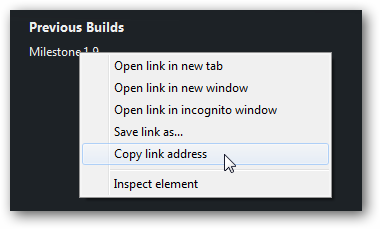
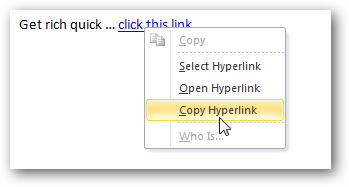
VirusTotal is an online service that scans files for viruses with over 40 different security tools. Since there have been security concerns with a wide variety of files that are normally safe, such as PowerPoints and PDF files, we’d recommend you scan any file you’re downloading, especially if it’s from an unknown source. To do this, just right-click on the file’s link, and select Copy link address.
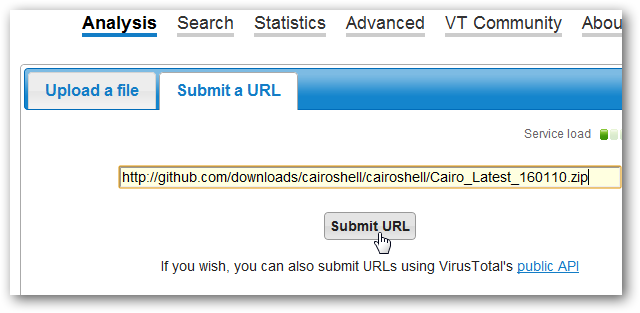
Now, browse to VirusTotal.com, select the Submit a URL tab, then paste the link in the text field and click Submit URL.
VirusTotal will quickly check the link against several URL analysis tools to see if the site is listed as a malicious site already. If it appears clean, your file’s more likely to be safe, but you still should check. To do this, click the View downloaded file analysis link near the top.
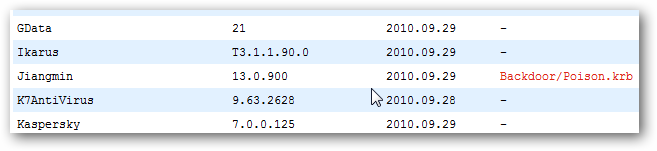
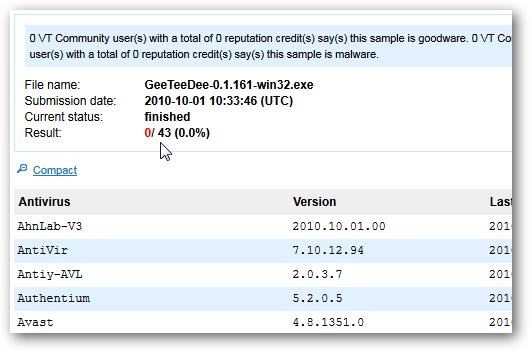
After a few moments, you’ll see the results of your file’s virus scan. If it shows that nothing was detected, then you can feel fairly safe that the file is fine to download and use. It is possible for a new malicious file to slip by all of the scanners, but very unlikely.
If one of the scanners does detect malicious content, it’ll list what it detected. Do note that sometimes a scanner will wrongly think a file contains a virus when it’s in fact clean, so if the majority of the scanners report that the file’s ok, you may still be fine to use it.
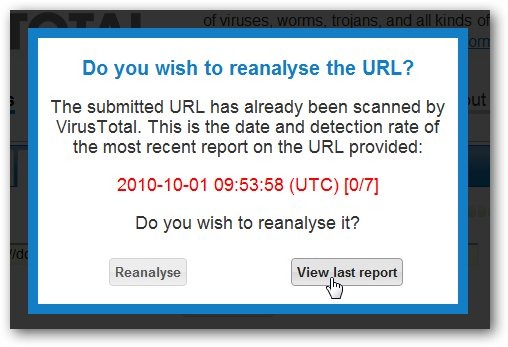
Also, VirusTotal may inform you that the link or file has already been scanned. You can choose to view the last report, or you could choose to reanalyze the link to be certain nothing’s changed.
You can use this same trick to check any website for malicious content, even if it doesn’t contain a download. If you’re emailed a link or come across a search result you’re unsure about, feel free to copy the URL and scan it with VirusTotal as before to see if the site contains malicious content.
Integrate VirusTotal Into Firefox
If you’re a Firefox user, you can check links and sites for malicious content without opening the VirusTotal site with the VTZilla plugin. Install the extension from their site (link below); Firefox may block the install by default, so click Allow then install as normal.
If you’re using Firefox 4 beta, it may inform you that the extension is not compatible with your version of Firefox. Follow the instructions at this article to bypass the error, and then install as before.
Now you’ll have a new VirusTotal toolbar in Firefox. You can enter a site address or file hash in the search box to check it on VirusTotal, or click Scan current site to make sure the site you’re on doesn’t have anything malicious on it (that said, it’s better to check the site before you visit it). If you’re not a fan of browser toolbar, simply right-click on the bar and un-check the VirusTotal Toolbar to remove it.
The best feature is the link scanner in the right-click menu. When you’re on a site with a download link, simply right-click the link and select Scan with VirusTotal.
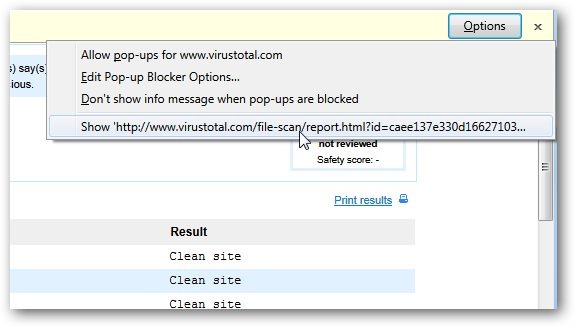
VirusTotal will open in a new tab and check the download URL to see if it’s listed as a bad domain on Google, Mozilla, and more, just like it would with a website. It’ll also open a popup with an analysis of the file itself; if you don’t see it, you’ll need to allow the popup from VirusTotal.
Now you’re able to find out if a download is safe in just a click or two. There’s no reason to worry if your downloads are safe anymore!
While VirusTotal can help keep you from downloading virus-laden files, it’s still not enough protection on it’s own. You should still keep your software updated and use an antivirus solution. We recommend using Microsoft Security Essentials; it’s free, lightweight, and works great. But no matter what you use, it’s still great to know that the files you download are safe to use, and this is where Virus Total comes in. Make it a part of your normal routine; we do, and it keeps us from installing junk all the time.



![sshot-2010-10-01-[16]](http://www.howtogeek.com/wp-content/uploads/2010/10/sshot-2010-10-01-16.png)


Gears of War 3 Delayed Till Holidays 2011
That’s the sound of many, many Xbox 360 gamers shouting unintelligible nonsense upon hearing the news that Gears of War 3 has been delayed from April, 2011 to the holiday season of 2011. Oh dear.
The game, which was scheduled for release on April 5, 2011, has been pushed back. Yes, you just read that in the headline and in the first paragraph. Redundant!
But why? Not really sure. Microsoft said, “The teams at Microsoft Game Studios and Epic Games have done great work thus far readying the title for release in the Spring of 2011. However, we’ve elected to move the launch of Gears of War 3 until Fall 2011 to make it the marquee title for the holiday season.”
“Elected”? That could be that Microsoft wanted a guaranteed hit for the holidays at the expenses of the springtime months (when no games come out anyway), so it moved it back a few months.
Or, the game needed a bit more work.
Either way, you’ll be playing it when everyone is saying “happy holidays!” to each other, like we’re all pre-programmed Sims.
Just a reminder: the Xbox 360 came out in November, 2005, so the little Microsoft box is getting up there in age.

peHUB » Six Months After Leaving Digg, Jay Adelson Opens Up, Hints at Stealth Project
Yesterday, at the TechCrunch Distupt conference, Digg founder Kevin Rose apologized for a recent redesign to the site that has turned off users in droves, lamented that Digg’s board once turned down an $80 million acquisition offer, and told the crowd that he was “burned out.”
At the time, I happened to be meeting with Jay Adelson, and the picture couldn’t have looked brighter by comparison. At a coffee shop in sunny Mill Valley, in Marin County, the former Digg CEO looked as relaxed as he ever has, dressed in shorts and sunglasses. The glass of lemonade in his hand served as a metaphor for his life since parting ways with Digg back in April.
I wanted to know how Adelson – a popular figure throughout the so-called Web 2.0 revolution (and co-founder of publicly traded Equinix before that) – was faring. We also talked, of course, about what he makes of what’s happened to Digg in recent months.
For the most part, Adelson has been mentoring 10-plus startups over the summer and has been making angel investments. But he also is working on a project (a startup?) that he says will most likely be revealed early next year. “I’m going to be involved in the creation of a number of [consumer Web] businesses over the next year or two,” he said. “I can’t really say whether or not I’ll be leading any one of them. The truth, to some extent, is that I don’t have the answers.”
He added, mysteriously: “Certainly by spring time, what I’m up to will be clear.”
Our conversation, edited for length, follows.
Q: Digg’s redesign has been portrayed as an unmitigated disaster. You were part of the redesign up to a point. What do you think of the backlash?
A: Digg is an interesting animal. It doesn’t matter what product you release. It doesn’t matter whether or not I agree or disagree with the philosophy. It doesn’t matter if anyone does. Change in the Digg community is unusually sensitive. And the Digg community — particularly the group of people who’ve made Digg great for so long — part of the wonderful thing about this community is the voice that Digg is able to give them. That very voice, that very control, is volatile when it goes the other way. And it’s just something that we grew to accept as an asset, not as a negative.
Back in March, when I was honing in on the details that, at least I thought would be a good product launch in the Fall, we always knew there would be a backlash, probably as intense as we’ve seen. It was not a surprise.
Q: But back in February, when we talked, the game plan sounded very different. We discussed a spate of niche sites, rather than what was ultimately released.
A: There’s so much data that they have now that I didn’t have six to eight months ago that’s relative to their decision making, so I can’t comment on that. We had identified more than year ago a series of things we thought were really critical to taking the site to the next level. One of that list of things was the “My News” product that’s allowed the changes you see in Release 4. So there’s nothing that you see in Digg 4 that we hadn’t talked about before. There’s obvious questions about the details, but again, I can’t really comment on the direction they went.
Back in February, I was excited about the idea of personalization and customization of your experience and I do think they stuck to that overarching theme, this idea of personalization. Because Digg’s homepage couldn’t suit different audiences. It was only suited for one audience.
Q: There was a time in 2008 when everyone thought Google was going to buy Digg. Yesterday, Kevin said that Digg once turned down an $80 million acquisition offer. Was that from Google?
A: I can honestly say that I am not familiar with the deal that Kevin is referring to. But even if I did, I couldn’t comment on details.Q: What happened with Google? Reportedly, you were really close, then everything fell apart.
A: The rumors reported of that activity always exceeded reality, but as a former employee, I can’t comment on any details.
Q: It seemed like Digg was always in play. Is that an unfair characterization?
A: That’s not at all the case. Most of the time we were busy with execution. Talking to companies about acquisition, for any executive team, is a massive distraction from doing the job.Q: TechCrunch has suggested that the reason there was so much speculation about a Digg sale was because you and Kevin were actively soliciting interest. Is there any truth to that claim?
A: As the company gained attention, I think it had an usual feature: Stories about Digg tended to get to Digg’s home page, and therefore would generate tremendous traffic to the publication reporting rumors. As a result, any rumors about Digg, even minor ones without any confirmed sources, tended to get coverage [and sometimes even went] viral.
Q: Michael Arrington reported back in May that Digg had six months to “get this ship going in the right direction.”
A: Six months to get the ship going — or what?
Q: That’s what I’m asking. Are investors thinking about letting it wind down?
A: At the time I left Digg, we had plenty of cash and we were funded to profitability. I think Digg’s investors, during my tenure, had been patient, waiting five years. Possibly Michael is referring to the tendency for VCs to push for an exit. Any time you take money from venture it comes with an implicit agreement that there has to be some kind of ROI eventually. Of course, I can’t speculate on these conversations after my departure.
Q: Rose also hinted yesterday that he might leave Digg by year end. What impact would that have on the company, in your view?
A: I really can’t speculate on Kevin’s relationship with the company. What I can say is that Kevin is one of the most creative and talented people in his field, so wherever he goes and whatever he does, he adds value.Q: When you announced that you were leaving Digg, you said that you were interested in incubating things. Have you been incubating ideas for startups? What’s been happening over the last six months?
A: I’ve been doing a little bit of everything. On the one hand, I’ve spent the last six months trying to separate from the community and to relax — ‘cause it’s been 20 years. From before I graduated [college], all of my jobs have overlapped, so I’ve been going nonstop. I get consumed with my startups. I get addicted to them. And one of my goals — I’m married with three children — was to get a little distance. It was very hard. After announcing I was leaving Digg, it’s almost like my noise level went up.
But also, the reason I got involved in Digg in the first place is because I really like to mentor entrepreneurs and I really enjoy lending what lessons I’ve learned to their process, and so while I’ve been trying to separate and create perspective, I can’t stop. So I’ve been helping many businesses over the summer, shepherding them from idea stage to funding. (Adelson later estimated that he’s been helping between 10 and 15 startups.)
Q: Are you working with them in a formalized way? How are you finding one another?
A: A lot is word of mouth. I’ve been doing this all along, too, and there’s a network of people who refer people to me for this stage of their lifecycle. Part of it is also that I go look. I’m insatiable when it comes to this stuff. As for the formality or lack of formality, just watch this space.
Q: Meaning? Are you going the “super angel” route, or will we see you at a startup as co-founder and CEO?
A: One thing is for sure. I’m going to be involved in the creation of a number of [consumer Web] businesses over the next year or two. I can’t really say whether or not I’ll be leading any one of them. The truth, to some extent, is that I don’t have the answers. I have a lot going on right now and I’m enjoying the opportunity to [contemplate] different directions. Right now I’m making investments. I’ve also taken advisory roles for equity and I’m advising companies where I’m not taking equity, where I’m doing it for the love of the people and the ideas. Certainly by spring time, what I’m up to will be clear.Q: And will you take lessons from Digg? For example, do you ever think back and wonder if Digg listened too much to its users?
A: Maybe it did. But I think there were a couple of things going on in terms of voices influencing Digg. One was the media frenzy over Digg as the media darling frontrunner in this whole Web 2.0 revolution, and that had a momentum of its own and it was very important for Digg not to be carried away by what people perceived it to be.
There was also the voice of the users. I think they could have driven Digg in a different direction. But you’d be blown away by how many decisions we made that we knew would piss off the users but would be better for the ultimate goals of the company. So we didn’t kowtow to users all the time, definitely not. I got myself into trouble many times because I was known for not kowtowing to every user whim. But I think the users understood that we were a business with longer term goals.
Either way, I didn’t have a reputation that I was concerned about. I didn’t have a position in the consumer Web story. I was CEO of a good business and just made decisions as I thought I should.
Q: Did you have any idea how powerful Twitter would become?
A: You know, to this day, I’ve never perceived Twitter as competitive to Digg. Maybe I’m just deluded. People do get their news via Twitter [and] they talk via Twitter. It’s a communications medium, but Digg is the content. So, in its simplest way, you could consume Digg via Twitter. You could consume Digg via Pownce for all I cared. [Pownce was a micro-blogging site co-founded by Rose in 2007 and shut down in 2008.] It didn’t really matter to me what the medium was. Being a true Web 2.0 leader, Digg needed to be extensible and not overly concerned about the mediums people were using to share this stuff. So we saw Twitter as an amplifier for Digg. Maybe that was short-sighted.
Q: It’s not clear how you could have reacted to it, in any case.
A: Exactly. It’s like text messages or maybe, 10 years ago, like AIM. People use it as a part of their communication and media consumption. In a similar vein, who would have thought that so many people would discover content through Facebook?
Digg could never have been a social network. It could never have been that kind of communications medium. Digg was what it was. And so the question is do you react to it and roll with those phenomena or try to become them? To displace a medium like Twitter was just not what I saw as one of our goals for Digg.
Apple TV Jailbreak — Complete!
The Apple TV is new — like brand-freaking new. Still, the system has officially been jailbroken with the SHAttered exploit previously used for iPod touch 4g hacking. This opens up a big door for all sorts of apps although the only one available right now is the native Lowtide.app. Thanks Dev-Team. You just gave everyone something to do this weekend.
[Dev-Team via Engdaget]
Print Files on Your Printer from Any Phone or Remote Computer via Dropbox [Video]
Print Files on Your Printer from Any Phone or Remote Computer via Dropbox
Tech how-to blogger Amit Agarwal details how to combine a Dropbox account and a simple script with any device that supports Dropbox (i.e., almost all popular smartphones and Windows/Mac/Linux operating systems) to remotely or wirelessly print documents on your home printer.
The video above demonstrates the script in action, but the four-step setup is pretty simple. The short version: 1) Install Dropbox on the computer connected to your printer, 2) make sure Dropbox is also installed on the device you want to print from (or set up an email-to-Dropbox service like previously mentioned Habilis), 3) run the VBS script on the printer-connected computer (available at Digital Inspiration) to create and monitor a PrintQueue folder in your Dropbox folder, and 4) send any file you want printed to the PrintQueue folder.
For more details and the script, hit up Amit's full post at Digital Inspiration.
Print Files from any Mobile Phone using Dropbox [Digital Inspiration]Send an email to Adam Pash, the author of this post, at tips+adam@lifehacker.com.
Your version of Internet Explorer is not supported. Please upgrade to the most recent version in order to view comments.Loading comments ...
In order to view comments on lifehacker.com you need to enable JavaScript.
If you are using Firefox and NoScript addon, please mark lifehacker.com as trusted.
 Tech how-to blogger Amit Agarwal details how to combine a Dropbox account and a simple script with any device that supports Dropbox (i.e., almost all popular smartphones and Windows/Mac/Linux operating systems) to remotely or wirelessly print documents on your home printer.
 ');
'); 

I will have to test this.
Transfer Music, Apps, and Other Data from an Old Gen iPod to a New One
Recently Apple released their new 4th generation iPod Touch & iPhones, and if you get the new generation you probably want to transfer your data. Here we show you how to do it easily using iTunes.
Here we’re transferring our data from the iPod Touch 3rd generation to the latest 4th generation model using iTunes 10.0.0.1 on a Windows 7 computer.
Here we have our iPod Touch 32GB 3rd generation device. Notice we have most everything in folders using the new iOS 4 feature. Since we don’t want to waste time setting up the new device with all the folders, apps, and music…we’ll use the backup feature in iTunes 10…yes iTunes…as it actually works well and you can register the device too.
Backup Old iPod
First plug in your old iPod and back it up. Just right-click on the device in iTunes and select Back Up.
Then wait while the backup process completes.
Register & Restore new iPod
Then connect your new iPod and click on the device and you’ll need to go through the registration process. Or you can register it later to if you want.
Now when you go to set it up, you have the choice to set it up as a new iPod, or restore from a backup. Here we’re selecting the most recent backup then click Continue.
Then wait for the process to complete. The amount of time it takes will depend on how much data was in the backup.
After the restoration is complete we were happy to see all of our data transferred to the 4th Gen iPod Touch successfully, including the folders we had created on the old device. Then of course we have the new featured included like FaceTime and the Camera app.
You can of course set it up as a new device and manually manage your apps and other content if you prefer that method.
Generally we try to stay away from iTunes as much as possible, and there are several alternatives out there. But for registering a new iPod and restoring data from the old one…the backup and restore feature works well.
![sshot-2010-09-30-[00-16-34]](http://www.howtogeek.com/wp-content/uploads/2010/09/sshot-2010-09-30-00-16-34.png "sshot-2010-09-30-[00-16-34]")
![sshot-2010-09-27-[17-31-24]](http://www.howtogeek.com/wp-content/uploads/2010/09/sshot-2010-09-27-17-31-24.png "sshot-2010-09-27-[17-31-24]")
![sshot-2010-09-29-[23-45-46]](http://www.howtogeek.com/wp-content/uploads/2010/09/sshot-2010-09-29-23-45-46.png "sshot-2010-09-29-[23-45-46]")
![sshot-2010-09-27-[17-20-05]](http://www.howtogeek.com/wp-content/uploads/2010/09/sshot-2010-09-27-17-20-05.png "sshot-2010-09-27-[17-20-05]")
![sshot-2010-09-27-[17-29-12]](http://www.howtogeek.com/wp-content/uploads/2010/09/sshot-2010-09-27-17-29-12.png "sshot-2010-09-27-[17-29-12]")
![sshot-2010-09-29-[23-58-32]](http://www.howtogeek.com/wp-content/uploads/2010/09/sshot-2010-09-29-23-58-32.png "sshot-2010-09-29-[23-58-32]")
![sshot-2010-09-30-[00-22-03]](http://www.howtogeek.com/wp-content/uploads/2010/09/sshot-2010-09-30-00-22-03.png "sshot-2010-09-30-[00-22-03]")
![sshot-2010-09-30-[14-58-25]](https://lh3.googleusercontent.com/blogger_img_proxy/AEn0k_ucE9JWveC07BUvCGUEWpru9floJpwrinUbvZ_hnyBiVzIOsZFZwldc1p6Cp4nCM8SowmihluVm9L0wFgZC3BBoDUuqkN57MeR6Ll5P6T_yY8f3eg_EGD_kb5mDiyTedFcaSsUMoFFaDWbU7pEp1_kawMH-wQ=s0-d "sshot-2010-09-30-[14-58-25]")


 Posts
Posts

